
You run a small business, and your planning tool should be built for exactly that.
Nydli is a small planning tool for people who run their own business. We promise to keep it that way.
You won't be digging through a hundred settings or paying for forty thousand features you never use. There's no forced AI, and there isn't much to set up, which is rather the point.
We're small business owners and solopreneurs ourselves, and this is the tool we wanted for our own workday.
- Hosted in Germany
- No forced AI
- Stays small on purpose
- Made in Norway

Time tracking
It's easy to see what you spend your time on
We built the timesheet so you never have to make a report yourself. Every hour you track is already in it, added up and sorted the way you work.
We used to track our hours in ClickUp too, and the tracking part was fine. It was the report that took an evening, because you have to build it yourself before you can see anything. So in Nydli the report is just there when you open it. You see every category you've worked in and every task you've logged hours on, with the totals already worked out, and there's a chart that shows where most of your time went.
So you can also see whether the time you're putting in pays off.
So what's different?
The big tools
- You build the report yourself, piece by piece.
- You pick a category every time you log an hour.
Nydli
- The report is already there, and you just pick the period you want.
- Your task already belongs to a category, so the hour goes there too.
PS: If you'd rather not count your hours at all, you can switch time tracking off.
One entry
You don't have to choose where to track the hour
Say you've just spent an hour writing the launch email. It belongs to the course you're building, it belongs to the launch, and you did it for a client.
In other tools you have to pick where you want that hour tracked, because they can only attach it to one place. So some of the things you'd like to keep track of, you just can't. You have to choose.
With Nydli you don't have to choose. You log the hour on the task, and the task is already in the course category and already labelled with the launch and the client.
So the same hour counts in all three totals, and you only logged it once. You never have to check whether the numbers add up.
Put the task in the wrong category? Just move it, and all the hours you've logged move with it.
Overview
It's easier to plan a week you can see
You can choose between a list and a calendar of your tasks. We built the calendar because some of us are very visual, and a list doesn't really tell you how full a week is.
When you see the week laid out, you can tell straight away whether there's room for one more thing, or whether Thursday is already gone.
It's the same tasks as in the list, so there's nothing to keep up to date in two places. A task with a start and an end runs across the days it takes, and you can tick things off and add new ones right there in the calendar.
What's inside
We're staying small on purpose
Nydli is a list, a calendar and a timesheet. You sort your work into categories, you do the work in tasks, and when you log hours on a task they go onto the timesheet already sorted. Below are the reasons we ended up building our own tool, and a couple of things we're oddly proud of.
-
Your data stays in Europe
We're a European company, our servers are in Germany, and the company that runs them is European too. No American company has your data.
Under the US CLOUD Act, American companies have to hand over your data when US authorities ask for it. It doesn't matter where their servers are, so an American tool with servers in Europe doesn't help. It all comes down to who owns the company, and that's why you're better off with a European one.
-
There's no forced AI in here
There's no AI slop or buttons cluttering up your workspace, and you don't pay for AI you never use. We will never send what you write anywhere to be analysed or to train something.
If you do want an AI assistant, you can connect your own. You can read more about that further down.
-
We'll make it better instead of bigger
We'd much rather make the things you already use work properly than pile loads of new features on top of them.
And we're not going to grow into the tool you're trying to get away from, even if we'd earn more by doing it.
-
You don't have to start from scratch
You can't really tell much from an empty screen, so we made nine templates for nine different kinds of business, from a design agency to a personal trainer. Each one comes with categories, tasks and a year of hours already logged.
That way you can tell within ten minutes whether Nydli is for you, without typing in a year of your own work first. If you like the one you picked, keep it and make it yours, or delete it once you've had a look around.
-
You won't find forty menus
Nydli has one menu bar with a handful of things on it, and your categories down the side. You'll have learned how it works in an afternoon, and after that you can forget about the tool and get on with your work.
We kept it that way because we were tired of tools where most of what you pay for is hiding behind a menu you never open.
-
We don't move the buttons
You know where everything is in the tools you use every day, without having to look.
We hate opening something we've used for years and finding that the button has moved, with a cheerful little tour explaining why it's better now. So we're not going to redesign the place every spring just to look busy.
-
There's only one kind of label
Other tools make you decide whether the thing you're adding is a tag, a label or a custom field. Then you've got three different systems to keep tidy, and you can never remember which one you used.
In Nydli you just add a label. Put “Urgent” on something and move on, or make a label for each client when you want a bit of structure. Then you can see every hour you've spent on that client, in one go.
-
Your code looks like code
Paste a bit of code into a task and Nydli highlights it properly, in any of 235 languages. That includes the ones nobody else bothers with. One of us teaches FPGA design, so VHDL and Verilog were never going to be missing.
PS: Python, JavaScript and HTML are in there too, obviously.
-
You can have more than one workspace
You've probably got something else on the go as well, a side project maybe, or a committee you somehow ended up chairing.
You can keep them in separate workspaces and switch between them without signing out and back in again, so the committee's tasks never turn up in the middle of your client work.
Our limits
Things we promise never to build
If it belongs in Slack, we're not going to build it. Every tool you've outgrown started out small, and then it went after bigger companies and grew to fit them. We've watched that happen to the tools we used, and we'd rather stay the size you actually need.
- Chat
- Documents
- A wiki
- A CRM
- AI agents
- Sprints
- Workload views
- An “ecosystem”
It's your choice
You can bring your own AI, if you want to
Maybe you've got Claude or ChatGPT open all day anyway, and you'd like it to help you in here too. That's fine with us, but you have to switch it on yourself.
We haven't built any AI into Nydli, so nothing happens until you connect your own. Your assistant reads your data where it is. We don't send your data to an AI company ourselves, so nothing goes anywhere until you connect one and start asking it things.
Only the owner of a workspace can switch it on, and we ask for your password when you do, so nobody can connect anything behind your back. Everybody in the workspace can see when it's on.
Your assistant can see everything you can see, and if you want it to, it can make and change tasks, categories and labels for you.
It can never delete anything. We didn't build it a delete button.
It can archive things, and you can undo that whenever you like. And if you change your mind, you cut the connection and it stops working there and then.
Our competitors
The big tools aren't built for you
We used them too. But if you read their front pages, you can see exactly who they have in mind, and it isn't people like us. These are their own words, straight off their home pages.
“Software to replace all software”
Software that does one job, then gets out of your way.
“60% of work is lost in context – and AI is lost without it”
Your hours stay on your tasks. Nothing gets lost, and no AI is involved.
“People and agents working as one team”
Just people here. You're the one doing the work, and you get the credit.
“Trusted by over 60% of the Fortune 500”
Trusted by two Norwegians and a cat. We'll grow, but that's the bar.
“The OS for human-agent teams”
A list, a calendar and a timesheet, made for a human.
“Your team just got bigger”
Your team is exactly the size you chose.
“Where teams and agents Think together.”
The thinking is yours.
“Keep work moving 24/7 with agents.”
Nydli doesn't work nights. Neither should you.
Nothing wrong with building for the Fortune 500. It's just that you're not them, and neither are we.
Coming from ClickUp?
You can bring your work with you
If you're already using ClickUp, you're probably thinking that moving over is far too big a job. You can't spend hours copying everything over by hand.
The good news is that you don't have to. We've built an import tool into Nydli, so you connect your ClickUp account and transfer what you want.
Your tasks, subtasks and the hours you've logged are imported too.
You also get to see exactly what Nydli is going to create before it creates anything, so there are no surprises.
The team
We're two people and a cat

We're Lene and Jonas, two Norwegians who got tired of the tool we were using and built the small version.
We've used the same project tool since back when it was still good, and now use roughly one percent of it. It grew out of all proportion, the way these tools always do.
We built it for ourselves, and we think you'll like it too.
The cat is called Ina. She's the office manager and runs a tight ship. Nobody else is allowed to sleep on the job. She's found her way into the app as well, we couldn't stop her.
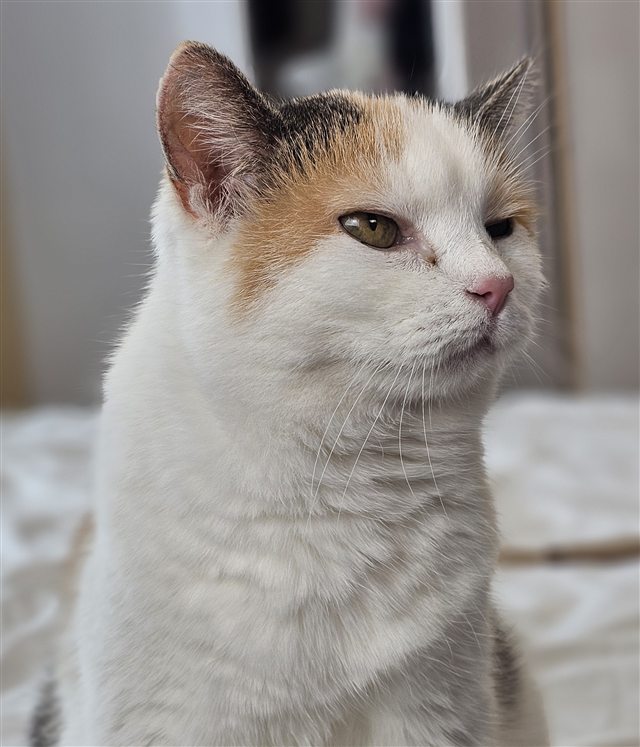
Ina Tangen
How it feels
Built by humans, and it shows
We think your tools should be something you like using.
We didn't want Nydli to feel like boring corporate software, so we've made it pretty and put a bit of whimsy in it. Some small touches that make you smile on a Tuesday morning.
We want it to feel like your own workspace, something creative and a bit of fun. You shouldn't feel like you're logging in to a big company's software.
Would you rather have it calm? You can turn it off and make everything plain and simple.
Questions
You've probably got a question or two
You're bound to be wondering about a few things before you put your name on a list. We've written down what we can tell you so far. If your question isn't here, write to hello@nydli.com and you'll get a reply from one of us.
When can I start using it?
We're opening a closed beta soon, with room for a small number of testers. We're keeping it small because we want to get things right with a few people before we let everybody in.
You won't pay anything to test it.
Leave your name and email on the list below, and we'll write to you when you can apply for a place.
What's it going to cost?
We haven't set the prices quite yet, but it will be affordable. It's made for a solopreneur or small business, and the price will reflect that.
We're not building Nydli for big companies, so you won't pay like one either.
There will be a 14-day free trial period. During the trial, you get access to everything. There's no gatekeeping. And we won't ask for your card until you are ready to subscribe.
Being a beta tester is free, and if you decide to stay with us, you will get an exclusive offer. You will pay less than everyone else for as long as you're a customer. If you leave and sign up again later, you pay what everyone else pays.
Do I have to track my time?
No. You can use Nydli as a list and a calendar and never touch the timer, and we won't nag you about the hours you haven't logged.
Can I use it with other people?
Yes, that's what Team is for. There will be two plans. Solo is for you when you work on your own, and Team is for up to five people, including you.
The two plans do exactly the same things. There's nothing you get on one and miss on the other. The plan only decides how many of you there can be, and how much room you get.
Everyone on Team signs in as themselves and logs their own hours. You give each person a role, and that role decides what they can see and change.
Since Nydli is made for solopreneurs or a small business, you won't find approval chains or a workload view for a manager. We're not building for the kind of company that needs them.
You can see the two plans side by side on the plans page.
Can I use Nydli if I don't run a business?
Yes. We never ask what you do for a living, and you can use the same categories and lists for anything you need to keep track of.
You can make a category for your daughter's handball and another one for the cabin. You can keep the football team you coach in one workspace and the board you ended up on at the housing co-op in another.
We write about Nydli as a tool for people running their own business, because that's who we build it for. You're very welcome to use it for everything else too.
Can I import my work from another tool?
If you're in ClickUp, yes. You connect your account and transfer what you want, including the tasks, subtasks and hours you've logged. Repeat rules, docs and whiteboards stay in ClickUp.
Today we only import from ClickUp. We'll be looking at other tools later, and we'll know more about what we can do when we get there.
You can read every step of it before you start, on the import page.
Can I export my work?
Yes, and you don't have to ask us for it. There's a button in Settings, and we pack up everything in your workspace, the tasks, the hours, the labels and the files and images on the tasks, and email you when it's ready to download.
You get the hours as a spreadsheet, and every task as a document you can open anywhere. Only the owner of the workspace can download it, because it holds everybody's tasks. It's your work, so you should be able to leave with it.
You'll find what comes in the file, folder by folder, on the export page.
Who can see my data?
Only you, and the people you invite into your workspace. We don't look at what you put in there, we never sell it, and we never send it to an AI.
It's stored in Germany, and you can download all of it whenever you like.
What languages is Nydli in?
You can have Nydli in English or Norwegian (bokmål). You pick the one you want in Settings, and you can change your mind whenever you like.
We're Norwegian, so we write both languages ourselves.
What happens if I stop paying?
You keep working to the end of the period you've paid for. After that we freeze the workspace for 90 days. You can read what you've put in and download everything, but you can't create or change anything.
Subscribe again inside those 90 days and you carry on exactly where you were. Nothing was moved or packed away. After the 90 days we delete the content, so export whatever you want to keep before then.
If you cancel, you can change your mind right up until the day your access ends. And if a payment just failed, the card is tried again over the following days. You can edit again as soon as it goes through. Both of those are on the subscription page.
Our help centre is already open, so you can see how Nydli works before you sign up.
We're launching soon. Made in Norway, hosted in Germany.